If Uddom features do not appear on your storefront at all, the app embed is almost always the cause. It is a single switch in your theme, and most features need it on.
Check the app embed#
- In Uddom, open Home and look at the Store health card. App embed should say Uddom is active on your theme.
- If it says Action required, choose Enable embed (or go to Growth and use the Turn on the app embed step).
- In the Shopify theme editor, open App embeds and switch Uddom on.
- Save the theme.
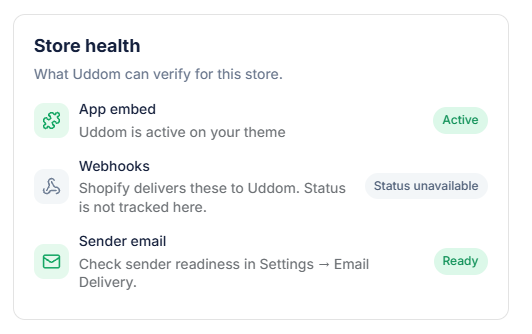 Store health: App embed status
Common mistakes#
| Mistake | Fix |
|---|---|
| Editing a different theme than the one published | Make sure you are customising the live theme. |
| Forgetting to save the theme | Save in the theme editor, or changes never reach the storefront. |
| The embed is on, but the module is off | Switch the module on under Growth → CRO. |
| The embed is on, but the module is not configured | Open Configure and save the module’s settings. |
Browser and cache#
- Check the storefront in a private window so you are not seeing a cached page.
- If you changed theme settings, give the storefront a moment to update.
Still not showing?#
- Confirm the module is enabled and configured — see Module not appearing.
- Some features depend on your theme having a particular element (for example a cart drawer). See Cart drawer cross-sell issues.