The Cart drawer cross-sell shows a small set of product recommendations inside the cart drawer, just before the checkout button.
What it does#
When a shopper opens the cart drawer, Uddom suggests products they might add. You choose where the suggestions come from — Shopify’s own product recommendations, or a list of products you pick — and how they look.
Why use it#
It is the last chance to add to the order before checkout, and a suggestion inside the cart drawer is seen at exactly the right moment. A relevant add-on lifts average order value with no extra effort from the shopper.
How to enable it#
- Open Growth → CRO and find Cart drawer cross-sell in the AOV booster group.
- Switch the toggle on.
- Choose Configure and set the source, layout and display.
- Save, then open a cart drawer on your storefront to check the result.
Configuration#
| Setting | What it does |
|---|---|
| Enable cart drawer cross-sell | Turns the module on or off inside the card. |
| Heading | Default: “You may also like”. |
| Recommendation source | Shopify product recommendations, or Manually selected products. Default: Shopify recommendations. |
| Maximum products | How many cross-sell products can appear at once. Maximum 8. Default: 4. |
| Exclude products already in the cart | Hides products the shopper already has. Default: on. |
| Add to cart button text | The label on each suggestion’s button. Default: “Add”. |
| Position in cart drawer | Above checkout button, Below cart items, or Bottom of cart drawer. Default: Above checkout button. |
| Layout | Carousel, Grid or List. Default: Carousel. |
Product display#
Show product image and Show product price are both on by default. In Manually selected products mode you also get Select products, where you search for and pick the exact products to recommend.
Shopify recommendations use product relationships provided by Shopify. Manual mode lets you choose exactly which products should appear.
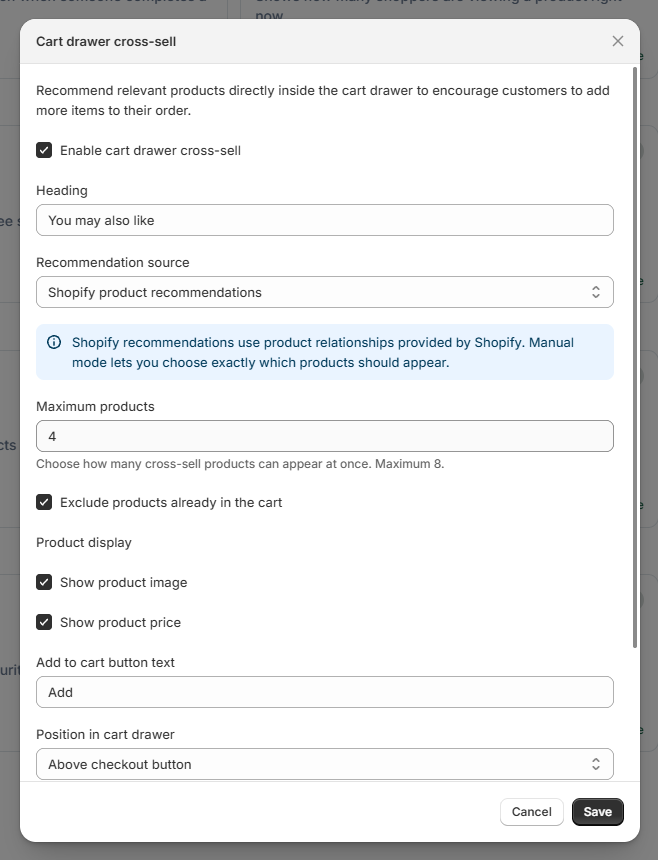 Cart drawer cross-sell settings
Choosing a layout#
| Layout | Best for |
|---|---|
| Carousel | Shoppers scroll sideways through suggestions. Keeps the drawer compact. |
| Grid | Shows several suggestions at once in a tidy grid of compact cards. |
| List | One suggestion per row, with a wider image and text. |
What customers see#
Inside the cart drawer, above the checkout button, shoppers see your heading and the suggested products with an Add button on each one. Adding a suggestion updates the cart straight away.
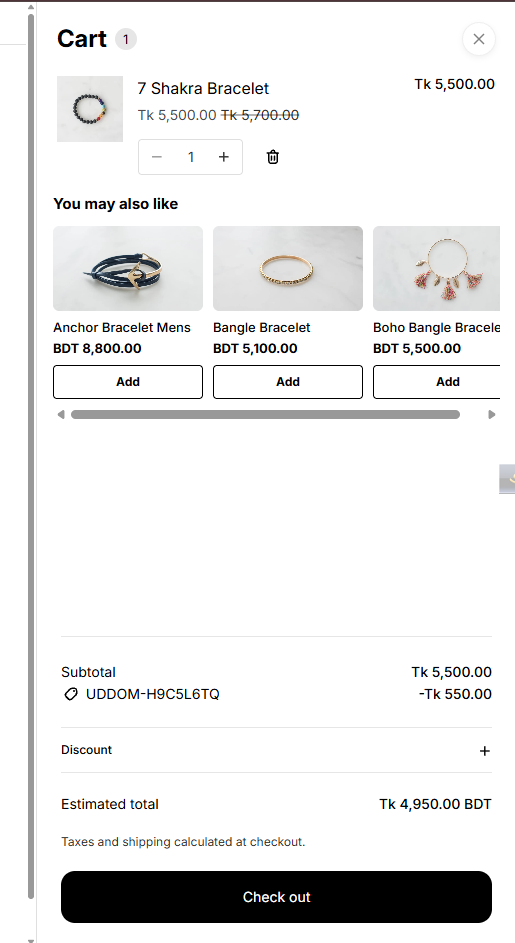 Storefront result: cross-sell inside the cart drawer
Best practices#
- Keep the number of suggestions small — three or four is usually plenty.
- Leave Exclude products already in the cart on, so you never suggest something the shopper already bought.
- If you use manual selection, choose genuine complements rather than near-duplicates.
Troubleshooting#
- Nothing appears in the drawer. Cross-sell needs a cart drawer. Some themes do not have one, or use a cart page instead. See Cart drawer cross-sell issues.
- Shopify recommendations are empty. Switch to Manually selected products and choose products yourself.
- Suggestions do not show. Confirm the module is switched on and configured and the app embed is enabled.