The Trust badge strip shows a row of reassurance badges near your storefront purchase area. You supply the images and wording — nothing is added on your behalf.
What it does#
You add badges, each with an image, alt text and a title (plus an optional description and link). Uddom shows them in the layout you choose.
Why use it#
Small trust signals — secure payment, easy returns, guarantees — reduce the hesitation a shopper feels just before buying.
How to enable it#
- Open Growth → CRO and find Trust badge strip in the Trust group.
- Switch the toggle on.
- Choose Configure, pick a layout and add your badges.
- Save.
Configuration#
| Layout | How it looks |
|---|---|
| Trust strip | One row of badges: image, title and description. |
| Compact inline | The most compact row — image and title only. |
| Badge cards | Cards with the image above the title and description. |
| Feature cards | Large cards with a prominent image, for stronger emphasis. |
Each badge#
| Field | What it does |
|---|---|
| Image | Upload your badge image (PNG, JPG, WEBP, GIF, SVG or AVIF, up to 5 MB). |
| Image alt text | Describes the image for assistive technology. |
| Title | The badge’s short label. |
| Description (optional) | A short supporting line. |
| Link (optional) | An https address the badge points at, such as your returns policy. |
Use Add badge to add one, and Move up, Move down and Remove to arrange them. Each layout allows a set number of badges; if you exceed it, Uddom warns you and will not save until you remove the extras — nothing is deleted for you.
The strip can only show once each badge has all three. Uddom tells you if something is missing before it can display.
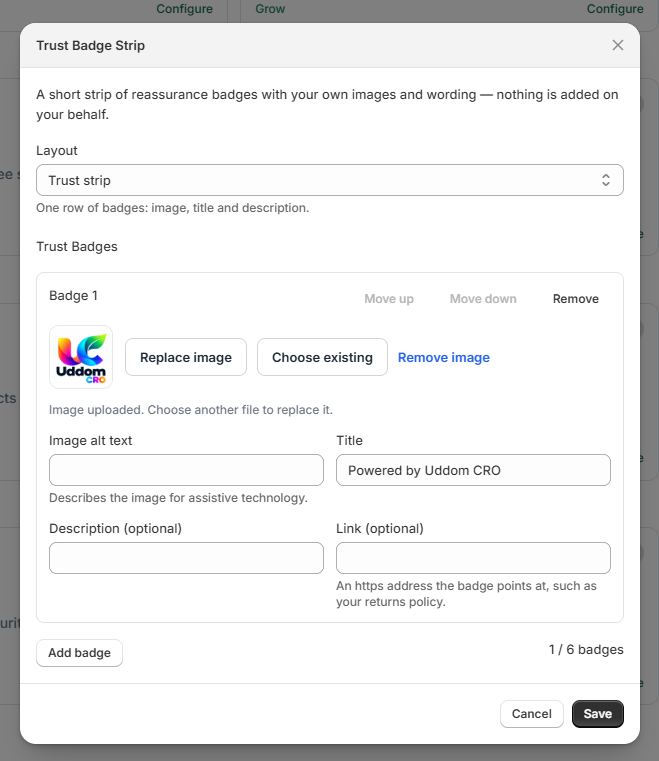 Trust badge strip settings
What customers see#
Shoppers see your badges in the chosen layout near the purchase area. Tapping a badge with a link opens the page you set.
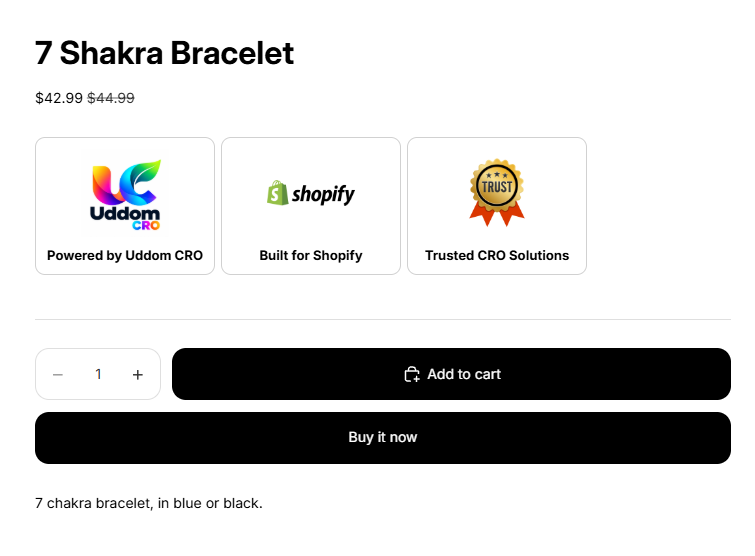 Storefront result: trust badge strip
Best practices#
- Only claim what is true — for example, do not show a returns badge unless you really offer that policy.
- Keep alt text short and descriptive.
- Use two to four badges; more starts to look cluttered.
Troubleshooting#
- The strip is not showing. Check every badge has an image, alt text and a title, and that the app embed is enabled.
-
My badge link does not work. Links must start with
https://.