Uddom supports subscriptions in two parts: you create the subscription options in the offer builder, and you review the resulting contracts on the Subscriptions page under Growth.
The Subscriptions page#
Growth → Subscriptions is a read-only view of the Shopify subscription contracts created from your Uddom subscription offers. It shows you what exists and lets you refresh it from Shopify — it does not create or change contracts.
| Element | What it shows |
|---|---|
| Sync from Shopify | Fetches the latest contracts from Shopify. |
| Total contracts / Active / Paused / Failed / Cancelled or expired | Counts by status. |
| Status filter | All statuses, Active, Paused, Failed, Cancelled or Expired. |
| Search | Find a contract by contract, customer or order ID. |
The table lists each contract’s Contract, Customer ID, Status, Products, Selling plan, Billing, Delivery, Next billing, Origin order and Last synced.
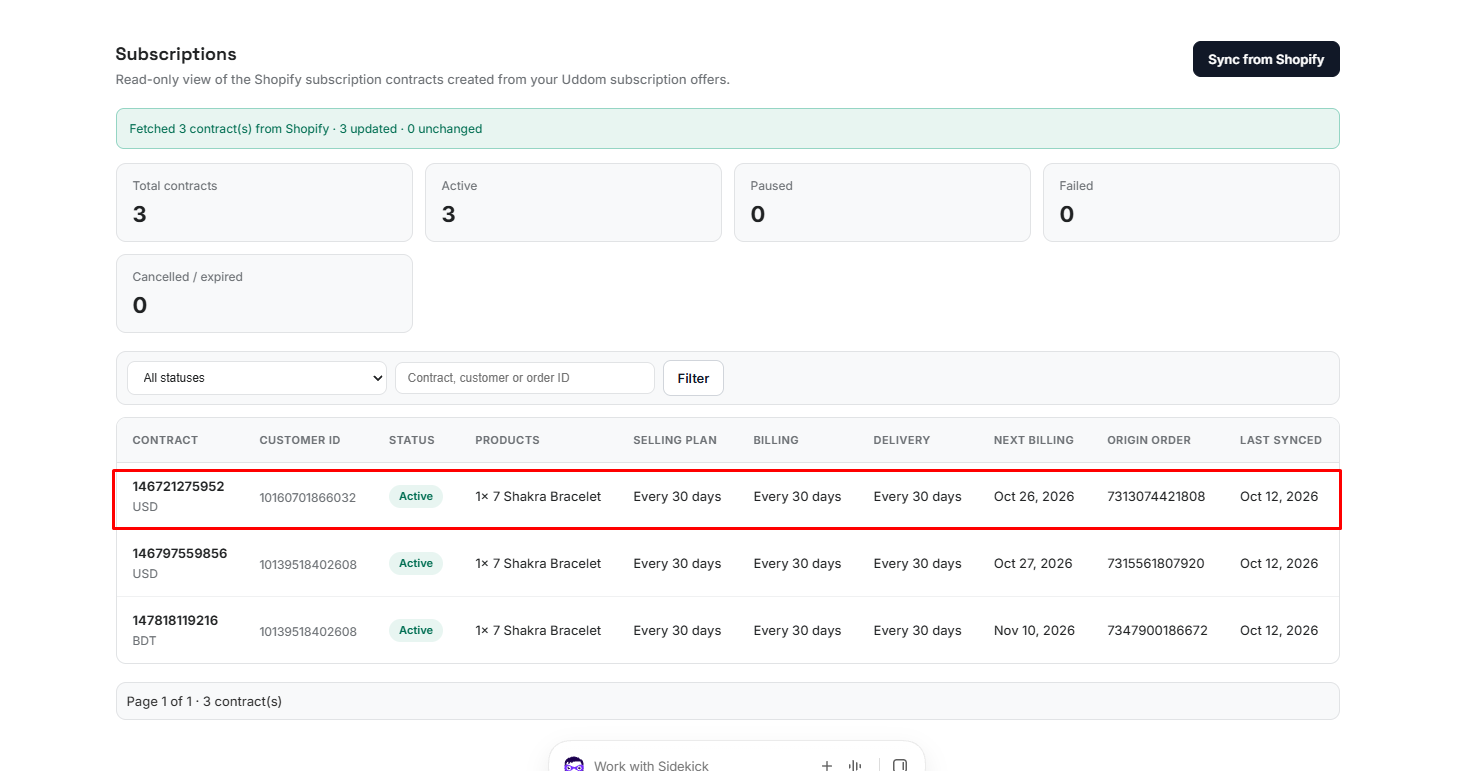 Growth → Subscriptions
Opening a contract#
Select a contract to see its detail page, which shows cards for Status, Schedule, References and Timestamps, plus a line-items table with Product, Variant, Quantity and Selling plan. Use Refresh from Shopify to update it.
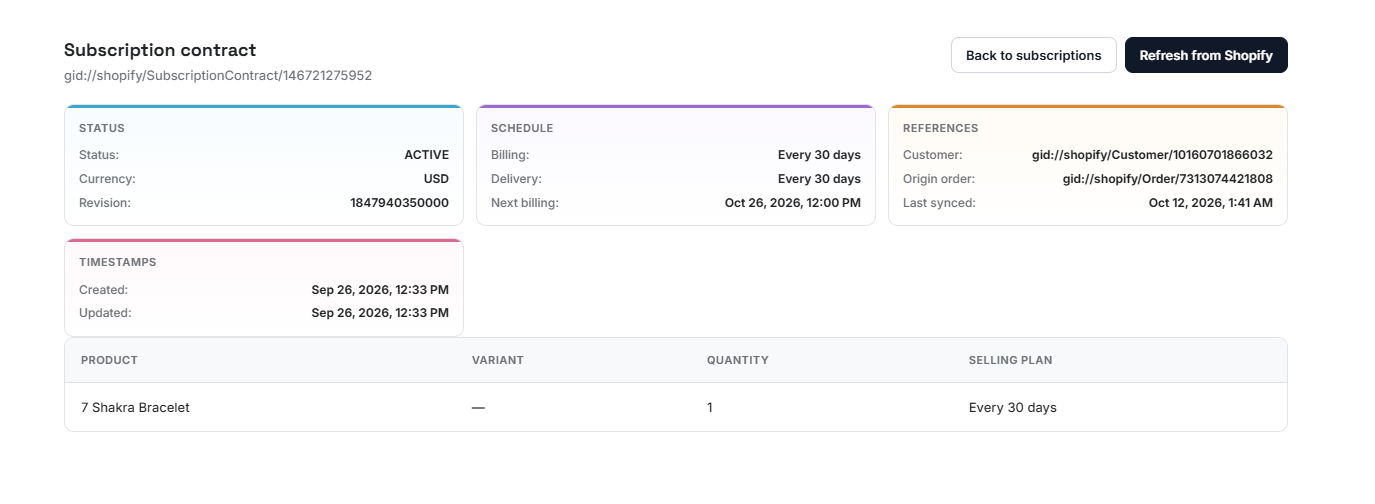 Subscription contract detail
Creating subscription options#
Subscription options are built into an offer. Create a Subscription or Bundle + Subscription offer — see Creating an offer — and set up its selling plans in the Schedule step’s Subscription settings.
| Setting | What it does |
|---|---|
| + Create subscription plan | Opens a modal to create a plan. |
| Group name | Names the selling plan group, for example “Subscribe & Save”. |
| Plan name | Names the plan, for example “Every 30 Days”. |
| Billing frequency / interval | How often the customer is billed (day, week, month or year). |
| Delivery frequency / interval | How often the customer receives the product. |
| Apply a subscriber discount | Optional. Choose a Percentage or Fixed amount discount for subscribers. |
Existing plans appear under Available subscription plans, where each can be Edited or Deleted. Choose the Selling plan group to attach to the offer.
Subscription plans attach to products, so add the offer’s products on the Products step before creating a plan. Uddom will prompt you if none are selected.
A plan that is still selected by an offer cannot be deleted. Deselect it in the offer and save first — Uddom tells you which offers are using it.
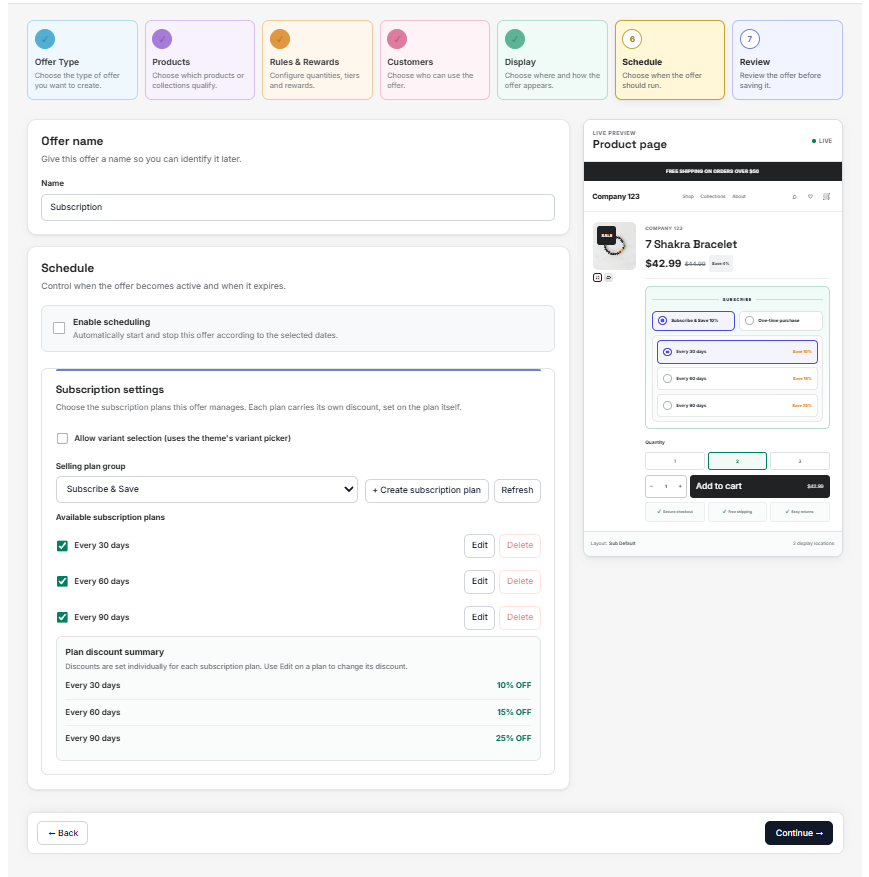 Subscription settings in the offer builder
Troubleshooting#
- No contracts yet. Contracts appear once customers subscribe through an offer that uses subscription plans. Choose Sync from Shopify.
- “No subscription plans found for this store.” Create a plan in the offer builder’s Subscription settings, then refresh.
- Line items are missing. Run Refresh from Shopify on the contract.