Uddom’s reporting lives under Insights. It shows how your modules are performing and how your experiments turned out, and it is careful to say when a number is not available rather than showing a misleading one.
The Insights areas#
| Area | What it shows |
|---|---|
| Overview | Headline figures for the period you select. |
| Module Performance | A per-module table of impressions, clicks, add to cart and attributed revenue. |
| Experiments | The results of your A/B tests, variant by variant. |
| AI Insights | Coming soon — not available yet. |
Choosing a period#
Every Insights page uses the same reporting period, chosen at the top: 7 days, 30 days or 90 days. The default is 30 days.
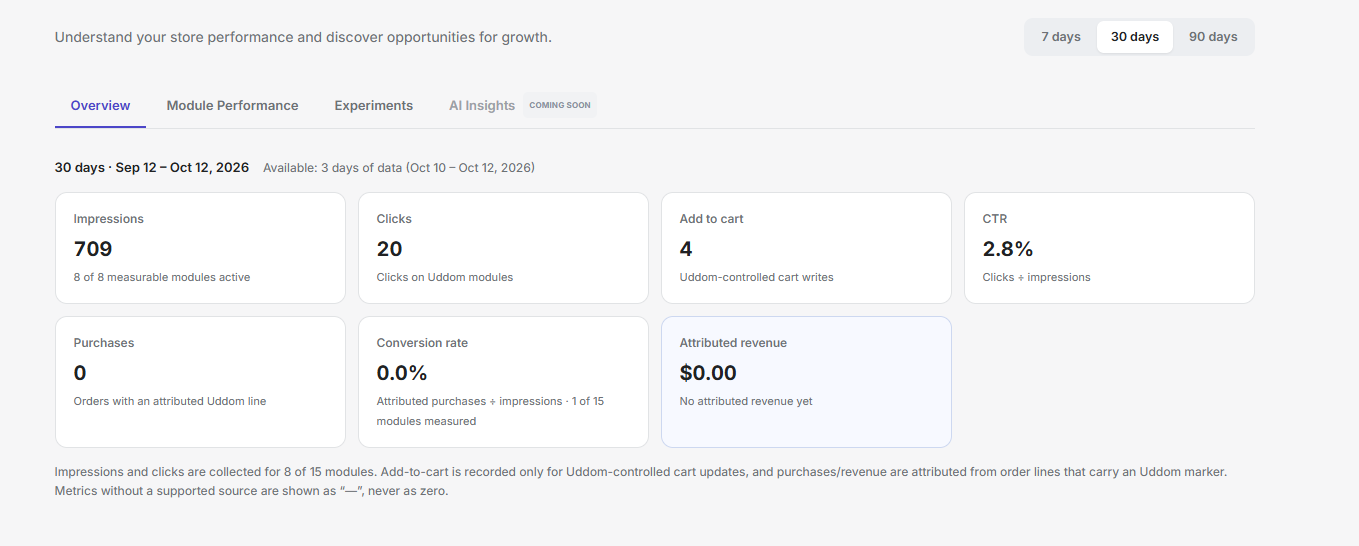 Insights Overview
Reading the numbers honestly#
Not every metric has a data source for every module. Where a metric is not measured, Uddom shows a dash (“—”) or Not measured rather than zero. A covered metric with no activity is a real 0; an uncovered metric is never shown as 0.
Each Insights page states what is and is not being measured so you always know what the numbers represent. The details are on Metrics.