The Products step decides which products an offer applies to. Choosing the right scope keeps an offer focused and predictable.
Applicable products#
| Source | What it does |
|---|---|
| Specific products | Pick individual products with + Browse products. The chosen products appear under Selected products. |
| Collection | Apply the offer to a Shopify collection. Choose it with + Select collection. |
| All products | Apply the offer to your whole catalogue. |
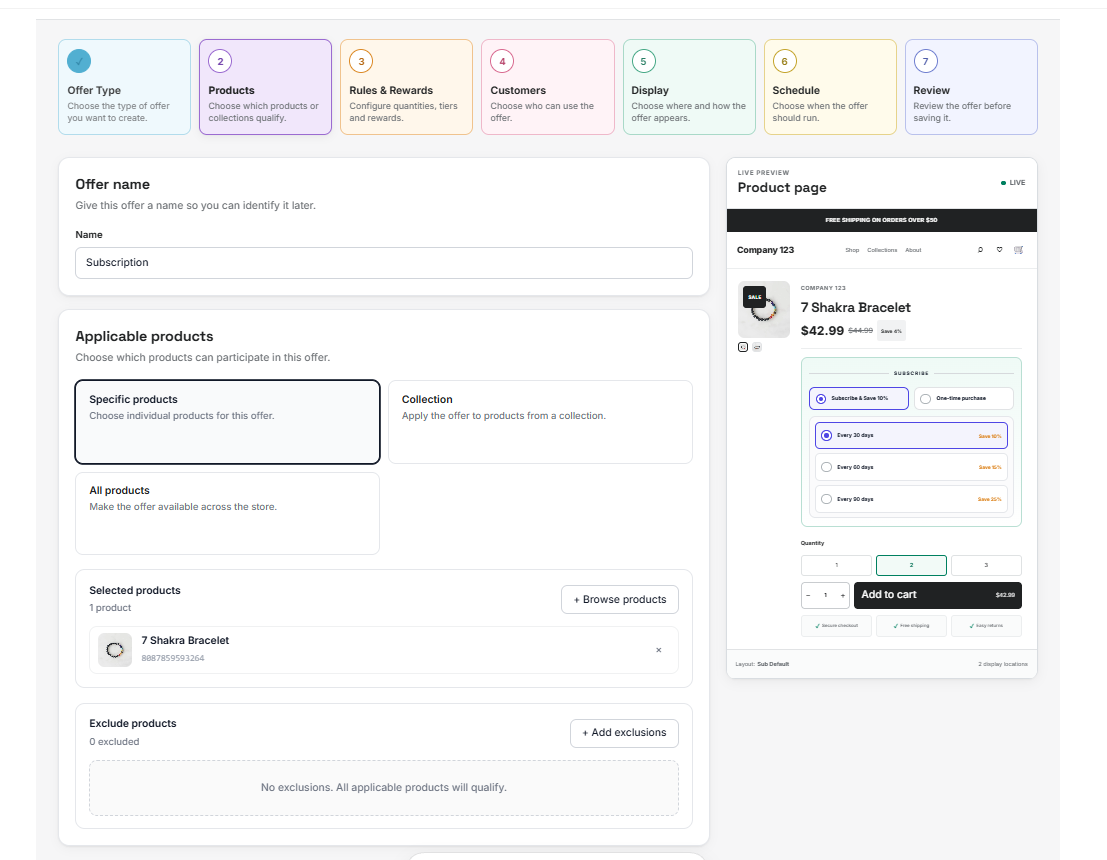 Applicable products
Exclusions#
Except for All products, you can exclude specific products with + Add exclusions. Until you add one, Uddom notes that no exclusions are set and every applicable product will qualify.
Bundle groups#
For bundle-style offers (Bundle, Mix & Match and Bundle + Subscription) the Products step also lets you:
- Allow customers to select product variants for the products in the bundle.
- Build Bundle groups with Add group, and set a Group name, Minimum items and Maximum items for each group.
A collection is usually the easiest way to keep a long-running offer aligned with your catalogue — when you add products to the collection, the offer covers them automatically.
Best practices#
- Use exclusions to keep a site-wide offer away from products you never discount.
- For bundles, set realistic minimum and maximum items per group so shoppers cannot build a bundle that is too small to be worthwhile.