Uddom has two related areas under Growth:
| Area | What it is for |
|---|---|
| Offers | Automatic discounts that apply at checkout with no code — quantity breaks, bundles, Mix & Match, free gifts and subscriptions. |
| Discount Offers | Reusable discount codes used by Uddom’s CRO features, such as the exit-intent offer. |
Which one do I need?#
- To reward shoppers for buying more, or to build a bundle, use Offers.
- To create a code that another Uddom feature shows to shoppers — for example the exit-intent offer — use Discount Offers.
The Offers page#
Open Growth → Offers. The page lists your offers with counts for Total offers, Active, Drafts and Paused, tabs to filter by type (All Offers, Quantity, BOGO, Bundles, Mix & Match, Free Gift, Subscription), and a Search offers box. Each offer row offers Pause/Resume, Edit, Duplicate and Delete.
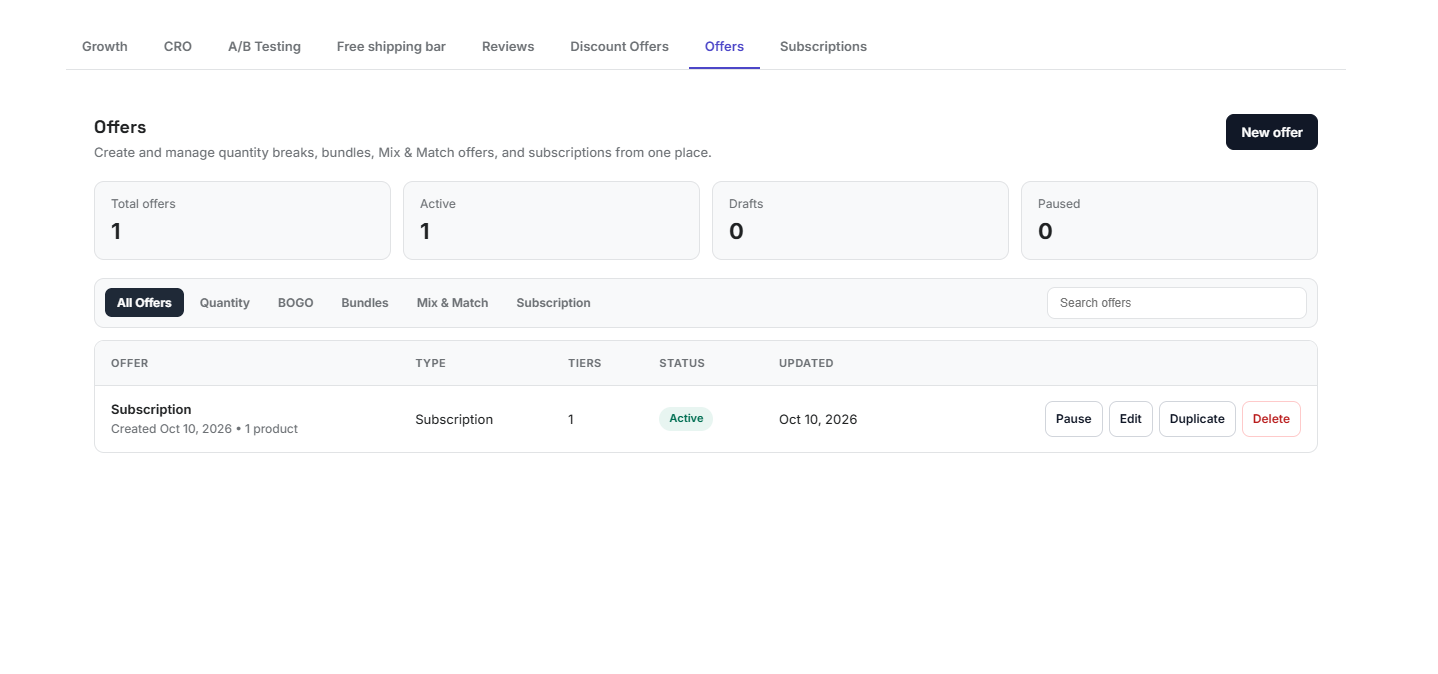 Offers list
What you can build#
There are eight offer types. See Offer types for what each one does, and Creating an offer for the builder.
Start with one clear offer rather than several competing ones. It is easier to see what is working and easier for shoppers to understand.